

Nabil SIP is one of the most-searched mutual fund phrases in Nepal. People know the bank name, then get stuck because the SIP is not run from the branch counter. It is run by Nabil Investment Banking, the capital market arm. Two schemes people commonly look for are NI 31 and Nabil Flexi Cap Fund.
That separation explains most of the confusion:
- Your mobile banking app can often pay into it, but it is not the place that shows your full SIP record.
- Your units sit under your BOID in your Demat account.
- Registration, statements and unit history live on the Nabil Investment Banking portal.
If you only want the Flexi Cap scheme in depth, use Nabil Flexi Cap Fund SIP. If you only need login links, use the SIP login directory.
Understanding Nabil Invest (The Capital Manager)
The very first thing you need to know is that commercial banks themselves don’t directly trade your mutual fund units. They use their specialized subsidiary companies.
Nabil Investment Banking manages the mutual fund schemes discussed here. These are market-linked investments, not Nabil Bank deposits. The bank connection does not guarantee your principal or returns; read the scheme’s current official documents before investing.
Which Mutual Fund Schemes Can You Choose?
Nabil Investment Banking offers open-ended schemes including NI 31 and Nabil Flexi Cap Fund. Compare each scheme’s current documents, fees, portfolio and risks before choosing.
Nabil Flexi Cap Fund: Compare its investment mandate, latest factsheet, fees, portfolio and NAV history. The fund can lose value, and a past cash dividend does not predict its future return.
NI 31: Read its current objectives, portfolio, fees and risk disclosures alongside those of Flexi Cap. A newer fund has a shorter live record and is not automatically a better starting point.
Historical Returns and Dividend Performance
A cash distribution is one part of total return, not a fixed interest rate. The 5% (FY 2080/81) and 9% (FY 2081/82) figures below come from Nabil Invest’s official Flexi Cap Fund page: https://nabilinvest.com.np/investment-banking/mutual-funds/nabil-flexi-cap-fund/ . Check its latest factsheet and compare distributions with NAV changes before deciding.
Let’s look at its recent performance:
- FY 2080/81: The fund delivered a 5% cash dividend.
- FY 2081/82: Nabil Invest reports a 9% cash dividend on outstanding unit capital. This is a historical distribution, not an annual return or forecast.
NAV can rise or fall with the value of the fund’s assets. A past dividend does not mean your units will keep growing, and a distribution can reduce NAV when cash leaves the fund. Compare total returns after charges rather than treating dividends as extra guaranteed yield.
What you need before registering
- 16-digit BOID from your Demat account
- Citizenship details — name and date of birth exactly as printed
- An email address you actually open — OTPs and recovery go there
- Mobile number
- Bank account details for the payment side
A Nabil bank account is not required to invest in a Nabil Investment Banking scheme. It only makes the nBank payment route available. If you bank elsewhere, ConnectIPS is the usual path.
New to the whole stack? Start here: How to open a SIP account in Nepal.
Nabil Bank SIP: Registration, Login and Payment Guide
How to Start Your Nabil Bank SIP Online
You can register through Nabil Investment Banking’s official mutual fund portal. Have your Demat BOID and matching identity details ready. A CRN is used for C-ASBA applications; do not assume it is required for an open-ended fund SIP.
At first, you need to create an Account with Nabil Investment.
- Go to the Nabil Investment Mutual Fund Page, click here,
- Now click/tap on ‘Sign up’,
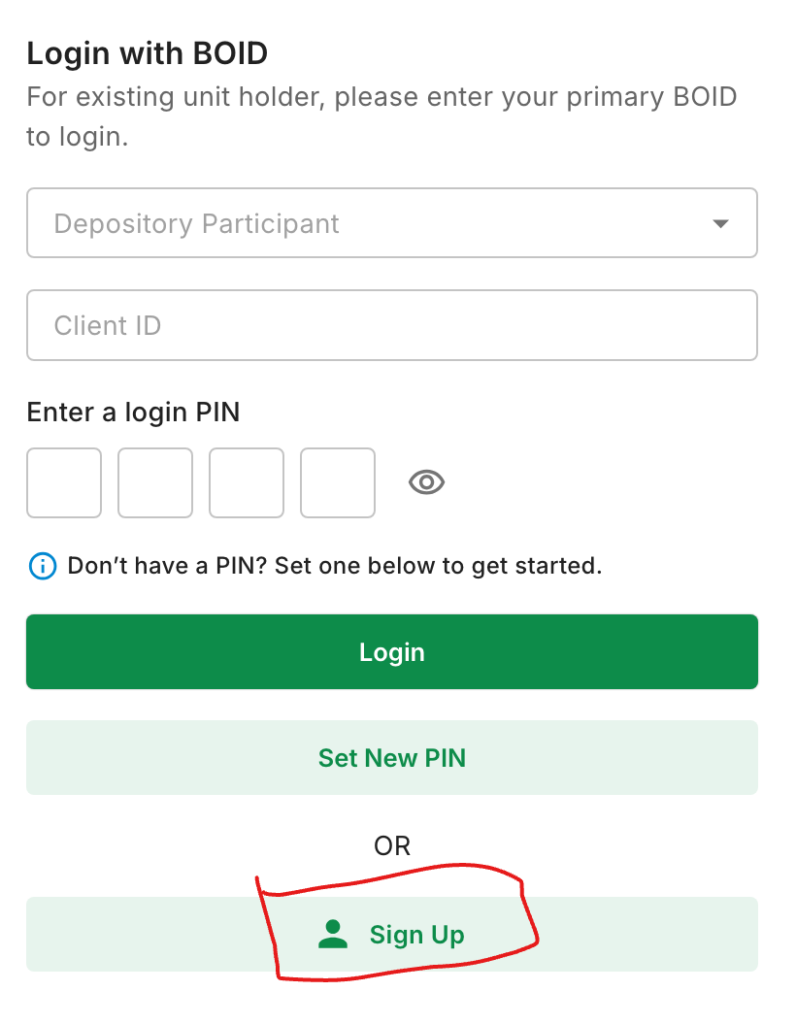
- Now, in the ‘Create a New Account’ section, you have to fill out all the details as shown in the screenshot,
- Choose ‘Account Type’ as Individual if you are registering as a person (not Firm/Organization),
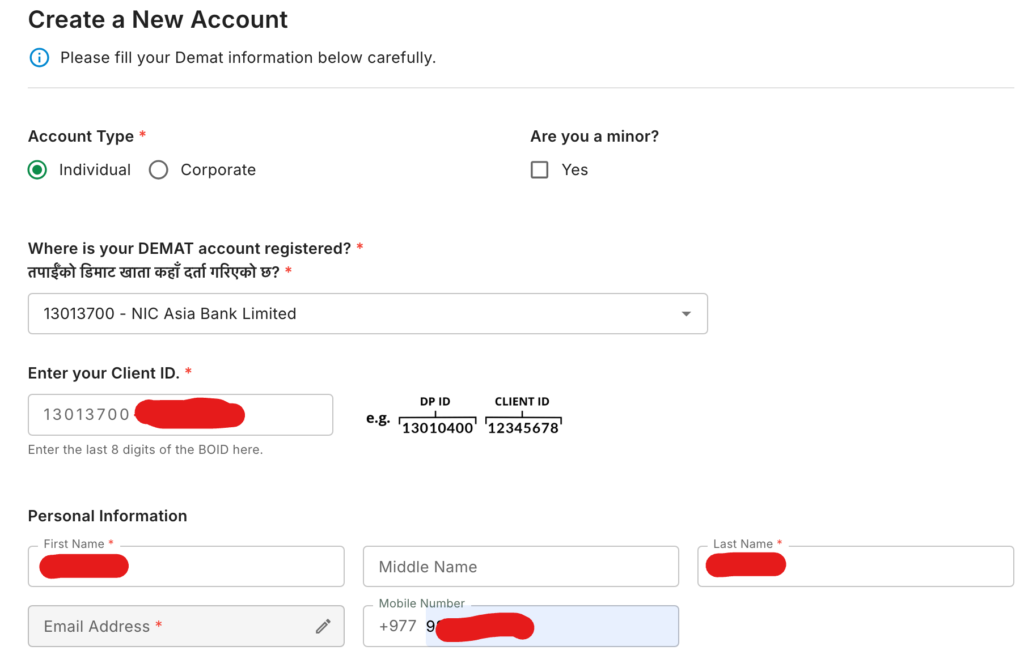
- Choose your Depository Participant (DP – Where is your DEMAT Account); here I am choosing NIC Asia Bank. If you have Demat on Nabil Bank, then choose Nabil Investment Banking,
- Now enter the last eight digits (Called ‘Client ID’) of your DEMAT,
- Enter your Mobile No. and then Email Address. After adding the email, tap on ‘Send OTP’,
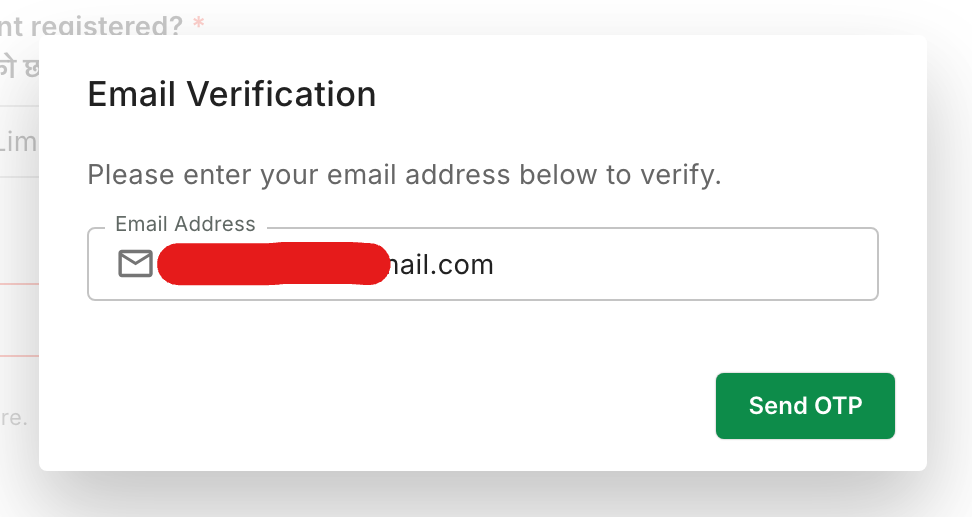
- Now enter the OTP to validate the mail; you can check the OTP that has been received in your Mail (Gmail or any other),
- Now fill out your Bank Details (You can also enter any other BFI’s details besides the same Bank in DEMAT),
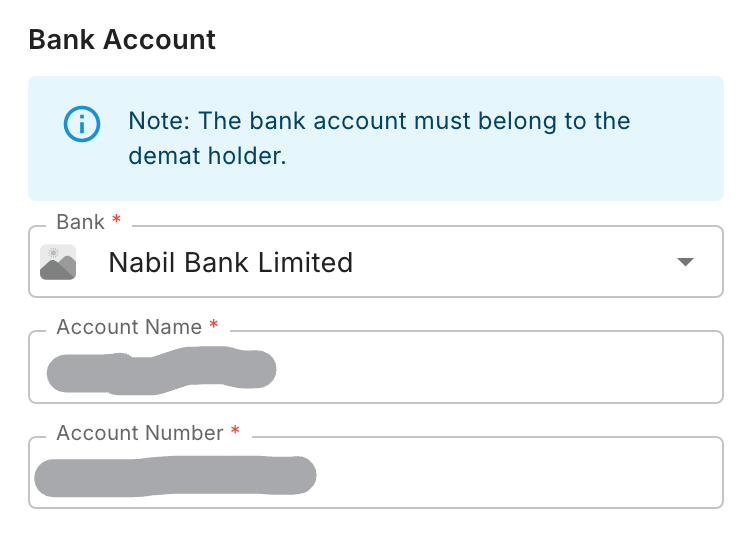
- Now upload the Demat Confirmation file by tapping/clicking on Upload,
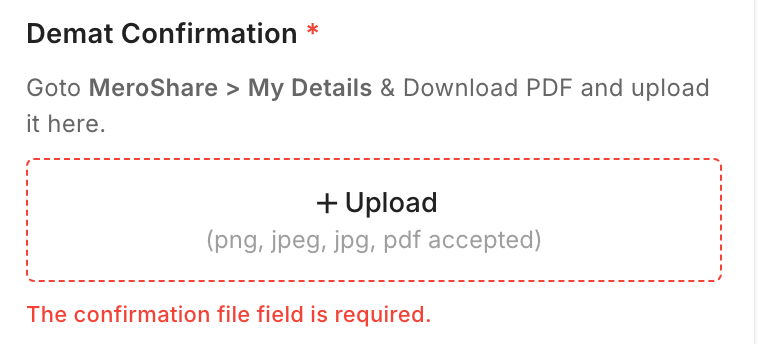
- Now set a PIN that is required while logging in to your account,
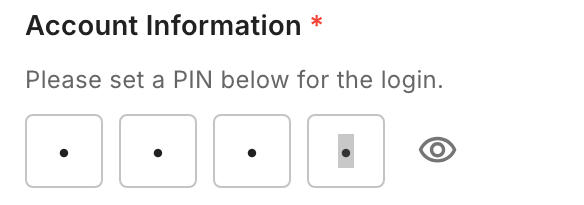
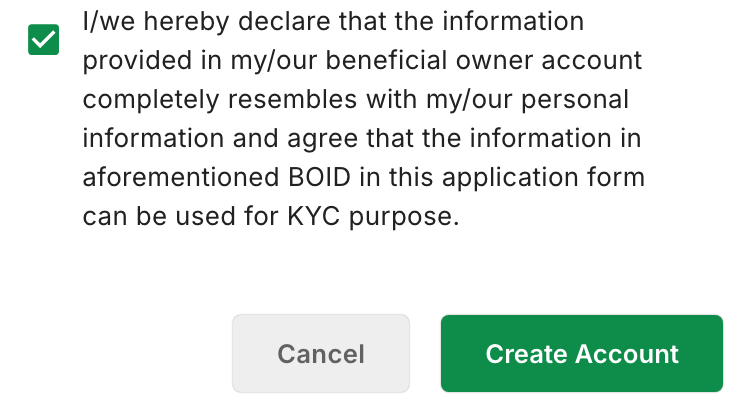
- After that check the terms and then tap on Create Account,
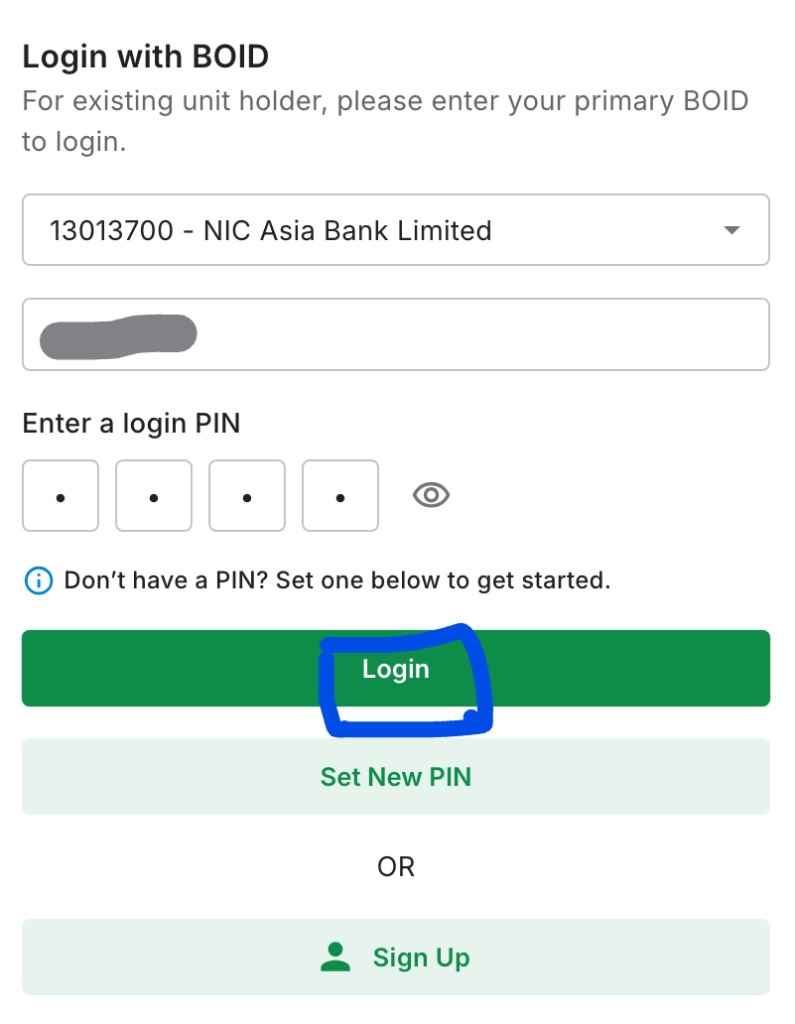
- After creating account Enter the Login Details and tap/click Login,
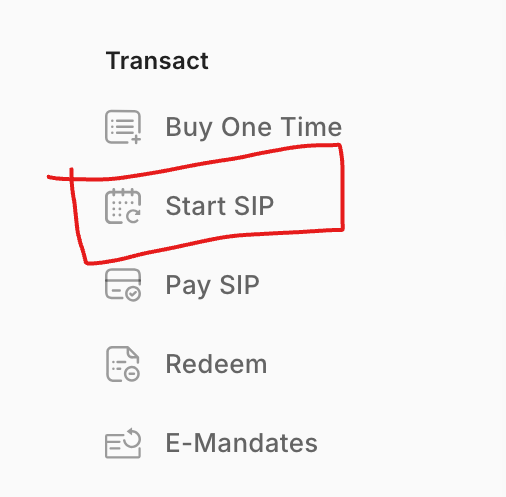
- Now from Dashboard find the Start SIP option and tap on it (shown under Transact),
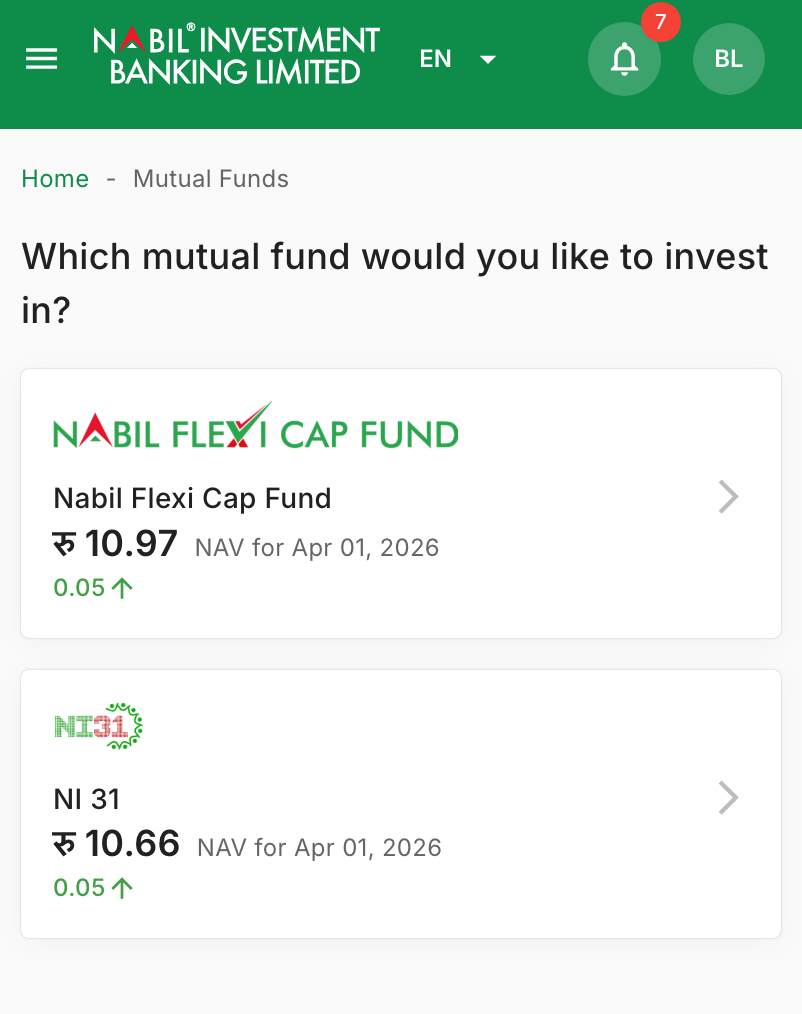
- Now choose the Mutual Fund Scheme where you want to Invest (as there are two SIP in Mutual Fund by Nabil Investment either Nabil Flexi Cap or NI31),
- Now set the SIP requirements as per your need,
- Enter the Installment Amount, Set Installment Interval as Monthly, Quarterly or Semi-Annually or Annually as per your need,
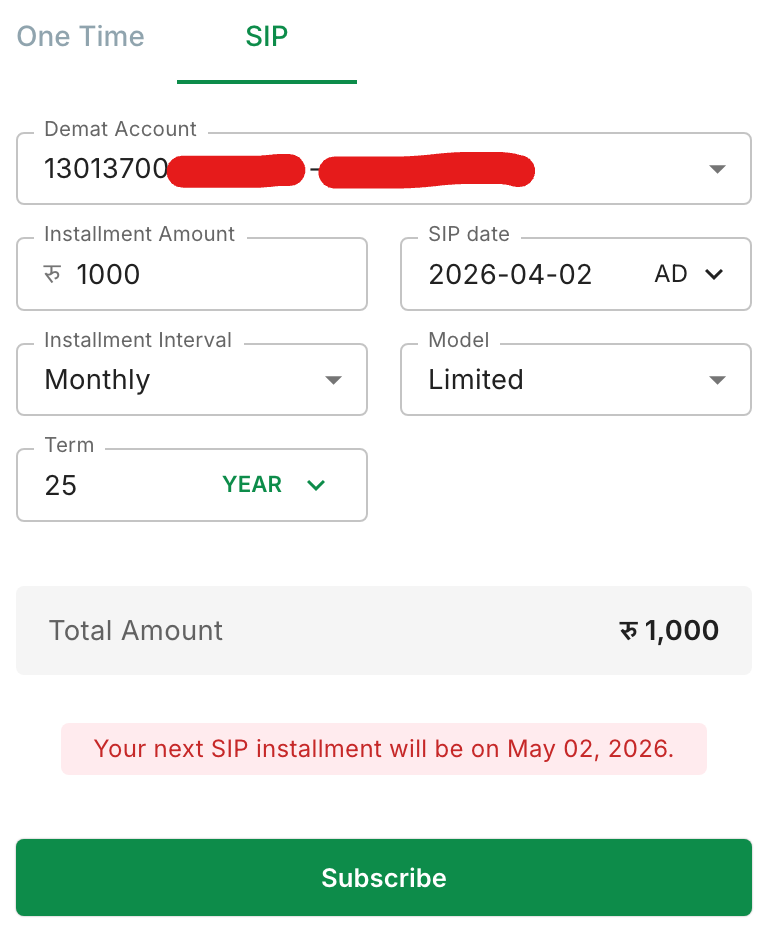
- Choose the Model as ‘Limited’ if you want to invest for certain period,
- After configuring all tap on Subscribe,
- Now you have to choose the source of fund as per your current Job status, and tap on I Agree & Continue,
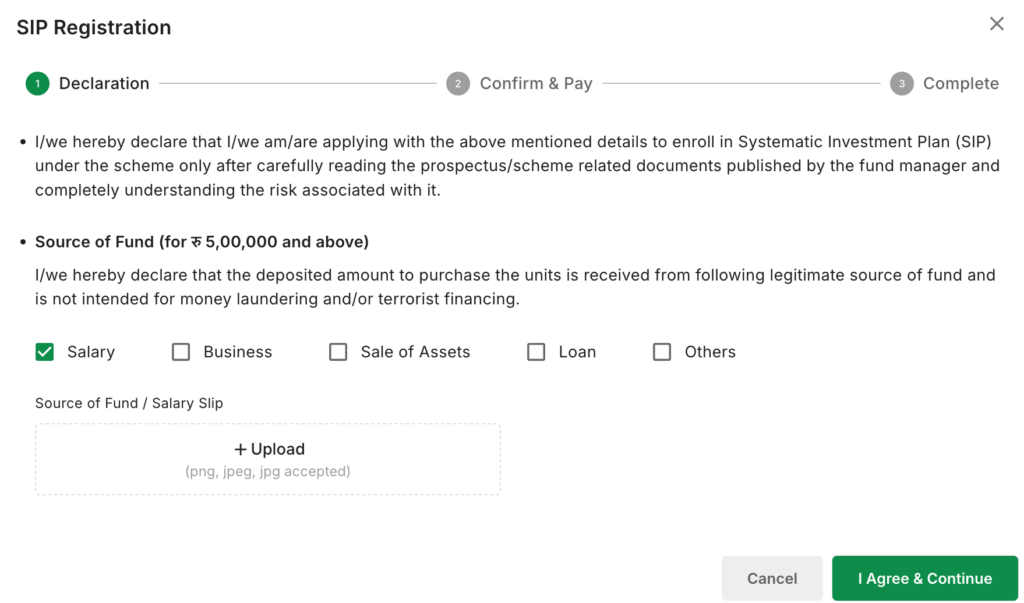
- Now here you will see the details of your SIP Plan, so make sure all are correct and as per you. Now choose the Payment Method and tap on Confirm & Pay,
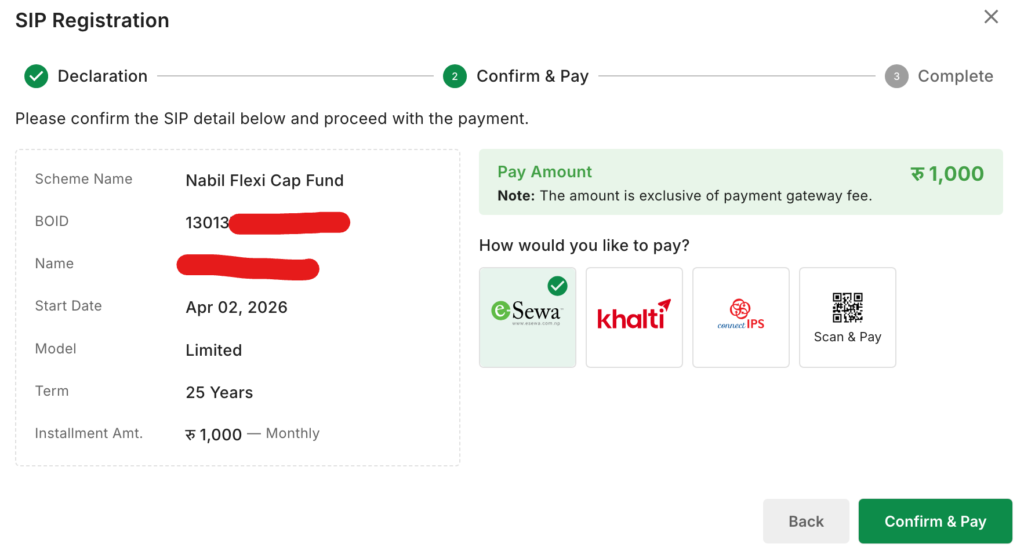
- That’s all to start Nabil Flexi Cap Fund or NI31 SIP online easily within few minutes.
Nabil SIP login
Login portal: click here,
Your Nabil SIP login is not:
- your nBank / mobile banking login
- your MeroShare login
After login, check the Nabil Investment portal for your transaction and unit statement. In my own payments, units appeared there within about two business days; that is my observation, not a service deadline. Nabil Invest says units generally take 4–5 working days to become visible in Demat/MeroShare, so distinguish its portal receipt from the later Demat display: https://nabilinvest.com.np/investment-banking/mutual-funds/nabil-flexi-cap-fund/ . If a payment is missing, retain its reference and ask the manager which NAV and processing date apply. See the NAV and allotment walkthrough for reconciliation steps.
More login troubleshooting across all managers: SIP login in Nepal.
What to compare before choosing Nabil Flexi Cap Fund
What Makes Nabil Bank SIP Different?
“Flexi Cap” describes the fund’s mandate, not a recommendation. Check its prospectus and current factsheet to see what assets it may hold and how the manager has actually allocated the portfolio.
Market capitalisation is one way to group listed companies by market value. It does not make large companies safe or small companies likely winners. Judge the fund by its current holdings, mandate, costs and risk disclosures instead of those labels alone.
A manager’s allocation decision may help or hurt results. Review performance over several periods, charges and the size of possible losses rather than assuming that a flexible strategy will outperform.
Paying your Nabil SIP installment
Through nBank (if you hold a Nabil account)
Nabil account holders can check the current nBank payment option. For app-specific steps, see our nBank SIP payment guide: https://sipcalculatornp.com/nbank-sip-payment-automation-for-nabil-sip/ . Confirm the account and amount on the official payment screen before paying.
Keep that guide as the step-by-step for the app. This page stays focused on the overall Nabil SIP map, so we do not duplicate the same click path in two places.
Through ConnectIPS (any bank)
Use this if you bank outside Nabil, or if you want a standing instruction style flow where the fund manager / ConnectIPS path supports it.
Typical shape:
- Start payment from the portal or from ConnectIPS as the merchant flow requires.
- Select the Nabil Investment Banking / mutual fund merchant label exactly as shown.
- Enter only the identifier requested by the official payment page. Never share an OTP or transaction PIN with a person or an unofficial form.
- Confirm amount and finish on a success screen.
- Keep the reference number until units appear.
A purchase request and a completed payment are separate. Save the payment reference and check the manager’s transaction record; an emailed acknowledgement may arrive later. Neither a success screen nor a debit alone confirms the number of units allotted.
Wallets and other channels
Supported channels can change. Before you rely on eSewa, Khalti or any wallet, confirm on the official Nabil Investment Banking payment instructions for your Nabil Bank SIP scheme.
For automation ideas across managers, see SIP e-mandate process.
Common Nabil SIP problems
Paid but no units showing.
Check the bank and payment-provider records first. If you cannot find a debit, check whether the payment is pending or failed before trying again; avoid a duplicate payment. If money left your account, keep the reference and ask Nabil Investment Banking to trace the transaction and confirm its NAV and allotment status.
Purchase request sitting unpaid.
Request and payment are separate. Pending request = no units.
Registration rejected.
Usually a name or date-of-birth mismatch against citizenship, or incomplete KYC at the DP.
Festival-season delays.
Around Dashain and Tihar, processing often slows. Pay a few days early in those months or later, or follow the exact installment to be disciplined in SIP investment.
Frequently asked questions (FAQ)
In everyday speech, yes. Formally, Nabil Investment Banking manages the schemes; Nabil Bank is the commercial bank.
No. You need Demat + BOID. A Nabil account only unlocks the nBank payment convenience.
Use Nabil Investment Banking’s official mutual fund portal at https://mutualfund.nabilinvest.com.np/auth. Reach it from the manager’s official website and check the address before entering credentials.
On the Nabil Investment Banking portal after logging in. General approach: How to check my SIP portfolio.
Yes, subject to scheme rules and any exit load. See How to close a SIP online (/how-to-close-sip/), then follow Nabil Invest’s current redemption process.
Different mandates, different risk shapes. Read both scheme documents against your horizon and what else you already hold.
Next step
Use the SIP calculator to test more than one hypothetical return, including a loss scenario. These outputs are illustrations, not a forecast or a reliable range for a real fund. If your goal depends on strong returns, reconsider the monthly amount, deadline and investment risk.
Conclusion
Nabil Investment Banking offers NI 31 and Nabil Flexi Cap Fund, but neither is suitable for everyone. Compare each scheme’s mandate, costs, current documents and risk with your investment horizon. Use the official portal for registration and payment, and keep your transaction records. This guide is independent education, not a recommendation or a promise of returns.


💬 3 Comments